

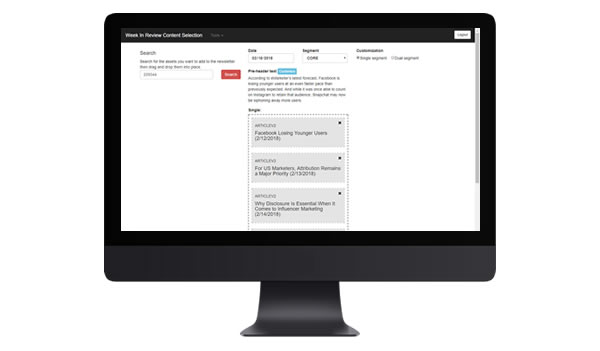
Newsletter Content Selection Tool

While our end customers and subscribers are the product team's most visible users, internal stakeholders and teams are as well. This project was a part of many efforts to streamline the day to day functions of the editorial team. Internal users were wasting hours on an archaic, difficult process. In the end, the Content Selection Tool was rolled out to all newsletters and eases the workload of users today.

Roles:

User Research
UX Design

problems:

Inefficient & cluttered

Content editors had to use a system with many touchpoints across various apps

No room for growth

Users requested new features, but due to the archaic system in place, these could not be implemented

Clean it up

Output email UI felt limited and clunky. For eMarketer to be competitive, this needed to change.

goals:

To design an improved, efficient system that would allow editors to structure daily newsletters in a single app

To address editor feature requests that had been too challenging to work on in the old system

To improve the end user's email experience with a cleaner designed UI

process:

Assumptions

  • Other than required information (date, mailing region/list, asset search and asset placement), there should be little or no effort required to build a newsletter.
  • To keep in tight communication with the end users (editors) to ensure the deliverable met their needs.

Execution

  • The basic concept was 3 simple sections:
    1. Newsletter information (mailing date, region/list to be sent to and preheader text (if not using default first asset)
    2. Asset search by ID then drag and drop into position
    3. Preview options for final reviewing
  • Decided to keep different mailing templates in different parallel sync apps to keep the taxonomy clean (Weekly emails built in a parallel app to daily, etc.).
  • To have some idea of what the final result would look like while still placing assets, I included the title and subtitle in the draggable tiles.
  • Implemented an autosave function that triggered at any action to ensure no lost work.
  • To ensure the editors could understand the application, we did some usability and training, but it went over well.

Concerns

  • 30+ unique newsletters went out weekly, so the process to create these had to be easy.

Hurdles overcome

  • After the initial release, requests were made to allow more complex functionality:
    • Wanted to be able to easily include a chart image if there was one in the asset
      • Solution: Added a checkbox to tiles whose asset had a chart in them that could be displayed.
    • Wanted to be able to release two versions of each email – one for non-PRO subscribers and one for PRO subscribers.
      • Solution: Changed the tile drop area to have room for two columns if the user indicated they wanted to make the non-PRO and PRO versions different.
    • Requested the ability to edit the preloaded content on an asset’s tile.
      • Solution: Added links to edit the content to their liking.
    • Asked to be able to write their own headlines, subheadlines and links.
      • Solution: Created the customizable asset option which creates a blank tile that can be filled in and placed.

Aside

  • The business also asked for a separate archive system to view of old mailings. In order to reduce the number of applications, we designed backdating into the system. With this, editors could simply select a prior date for a newsletter that had already been built and it would load in this system the way it had been sent.

results:

Goal: To design an improved, efficient system that would allow editors to structure daily newsletters in a single app

The final product allowed editors to put together newsletters in a single page app with more customization than they had ever had before. The efficiencies earned also cut down the time it required to put together a mailing.

Goal: To address editor feature requests that had been too challenging to work on in the old system

Before, during and after the new app was developed, editors introduced feature requests that were added to the system. (see 'Hurdles overcome' section above)

Goal: To improve the end user's email experience with a cleaner designed UI

With a single system to generate email code and new features available, emails were more intuitive and useful than before.